How to Search the AAE Directory
When you click “Find an Editor” on the navigation bar, you will see the default AAE directory page, which includes the business cards of all AAE freelance-editor members presented in random order. Follow the directions below to filter the directory and see members’ full profile pages.
How to Filter the Directory
Use the blue drop-down menus to select the editorial services, materials experience, and skills that match your needs.
Start with choosing your most basic need(s).
After selecting from a dropdown menu, click "Search" to apply your selection(s).
You may use multiple dropdowns, but click “Search” after making your selection within each; doing this refines the list.
Use the keyword search (white text box with “Search for…”) to specify subject area specializations and skills not covered by the dropdowns.
For example, use it for specific terms (Baroque, French, landscape, Indigenous, etc.).
A keyword search will look for exact matches first, and partial matches if there are no exact matches.
For example, if you type in Japanese design, the system will look for editors whose profile pages include that exact word string.
If no members’ profiles include the exact word string you entered, you will see this message just below the blue dropdowns:
“There are no exact matches for your search, closest matches shown.”
followed by what the system has determined are the next-best matches.
If this happens, try entering key words one at a time (e.g., for the above example, only the word Japanese or only the word design), as these searches will produce different results.
Search Results
Each time you click “Search,” a refined list of AAE members who match all of your dropdown and keyword criteria will appear. Results appear in random order.
What you see in search results are the business cards of editors who match your search criteria. Each provides an editor’s name, one-line summary, location, and a link to their website if they have one.
To see an editor’s full profile page, where you can read more about them and contact them, click their business card.
Please note: Terms you selected in the dropdown menus may not appear verbatim on a member’s profile page, even though the member matches that criteria.
Refine or Expand Your Search
If you get very few results or “No matches for search,” widen your search by:
unchecking one or more selected dropdown criteria
trying different keywords—or no keywords at all (keywords are optional)
If you get lots of results, you may narrow your search by selecting additional dropdown criteria, adding keywords, or using different keywords.
Contact an AAE Member
To contact an AAE member, go to the bottom of their full profile page and click “Send a Message.”
When composing a message to an editor-member, provide them with details about your editorial project (e.g., the topic, the type of editing or related service you are looking for, and your timeline).
Preview your message and click “Send.”
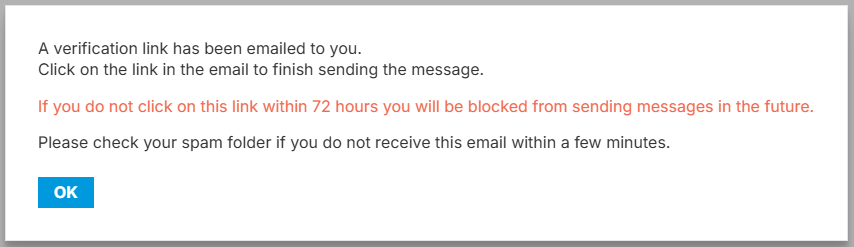
A pop-up window (right) will tell you that a verification link has been emailed
to you. You must click the verification link emailed to you to complete delivery of
your message. Once verified, your message will be delivered directly to the
AAE member's email.
Please note: If you do not click the confirmation link emailed to you within 72 hours, the system that manages AAE’s membership directory will assume you are a bot and block your email address. If this happens, you will need to use a different email address to contact AAE members in the future.
Still Have a Question?
Contact Emily at the email address below.